

Nick Fernandez / Android Authority
TL;DR
- NeoStation is a new emulation frontend that just entered beta.
- It has a slick UI, built-in cloud saves, RetroAchievements support, and an easy setup process.
- The app is downloadable for free today, with a Play Store release coming very soon.
If you’ve ever dabbled in the world of emulation, you know how quickly your collection can get out of hand. Emulation frontends help keep things nice and organized, but a new app called NeoStation goes above and beyond what traditional frontends like ES DE and Beacon offer, with a plethora of unique features.
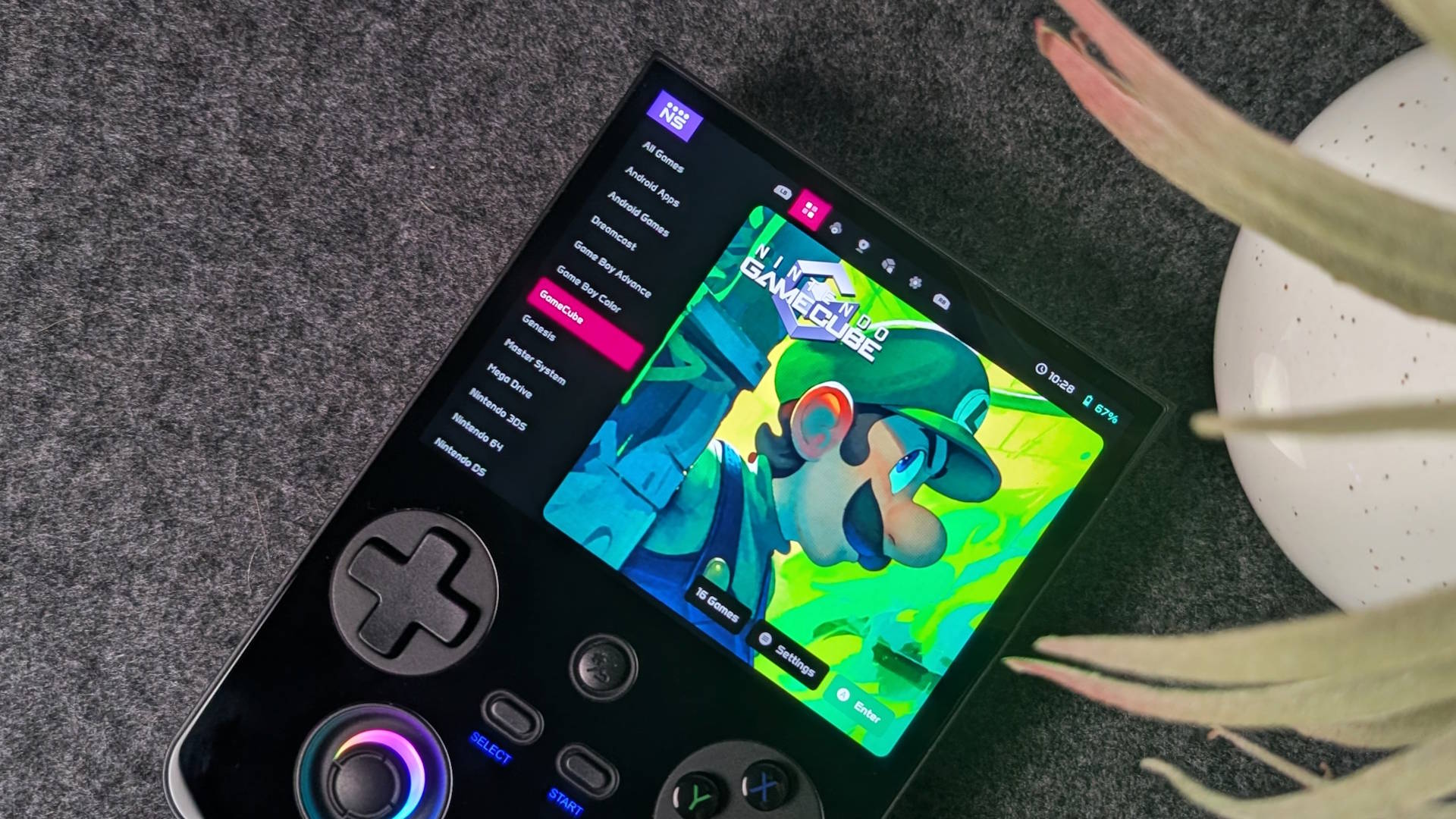
NeoStation, the brainchild of solo dev Miguel Soto, just hit beta with a slick new UI redesign. After a quick, easy setup (you have to delete the app if you have an older version), it displays all the games on your system, including Android games and apps on mobile devices.
The new carousel view features gorgeous artwork, which you can replace with your own in settings. You can also switch between different themes, including an OLED option with absolute blacks to save battery life.
NeoStation has an easy setup, slick UI, and unique features like cloud saves and RetroAchievements support.
Unlike some alternatives (I’m looking at you, ES DE), NeoStation also supports both full touch and controller navigation. Previous versions also had a vertical mode, which was great for phones, but that has been removed with the new update while it undergoes a redesign.
Once set up, you can easily navigate between systems, scrape game art, and more. It’s also easy to switch the default emulator a game launches into, whether that’s a specific RetroArch core or a standalone emulator like Dolphin or PPSSPP. NeoStation also scans your system to see which emulators you have installed, reducing confusion for apps that have several different versions. It also marks which emulators are compatible with RetroAchievements with a small trophy icon.
The app has several great integrations, including RetroAchievements for hardcore retro gamers. The achievements list has been redesigned in the beta to be less intrusive, but it’s an easy way to track your progress. There’s also a new tab for RetroAchievements’ “Achievement of the Week,” which challenges players to complete a specific achievement and engage with the community.
Don’t want to miss the best from Android Authority?


The app also features a unique cloud-saving feature called NeoSync. If you choose to create a (free) account, you can automatically sync your retro game saves to the cloud, and pick up where you left off on your phone, PC, or retro gaming handheld. The list of supported emulators is growing, but you can see current Android compatibility below.

It’s not required to create an account to use NeoStation as a simple frontend, but you do have to pay for storage beyond the first 4MB. That said, the seemingly paltry amount of storage is enough for hundreds of retro game saves. There are also plans to incorporate Google Drive and RomM in the future, and you can always use other methods like Syncthing.
NeoStation is free to download for Android, Windows, Linux, and macOS, with an iOS version coming soon. At the time of writing, you have to sideload the APK on Android, but the Play Store version should launch in the next day or two. Find the full list of download links at the official website.
Thank you for being part of our community. Read our Comment Policy before posting.
 By
By