

Hadlee Simons / Android Authority
I’ve owned an NVIDIA Shield TV Tube since 2020, and I’ve been somewhat happy with my purchase due to its wide variety of features and endless stream of updates. I do have some serious complaints, though. My biggest issue is the lack of ports, but I also found that it requires a factory reset every year or two due to significant performance problems.
Acer announced the Acer 4K UHD Google TV Streaming Box in South Africa late last year, and this looked like the answer to my prayers. This Google TV box is made by prominent ODM SEI Robotics, but a closer look revealed that it easily met my requirement for more ports. This theoretically means I can plug in my portable hard drive for no-frills local media playback, or easily plug in a flash drive to transfer APKs. I recently splashed out on the Acer TV box and, after using it for roughly six weeks, here are my thoughts on making the switch.
How important are ports to you on a Google TV box?
1 votes
So many ports, but some significant oversights
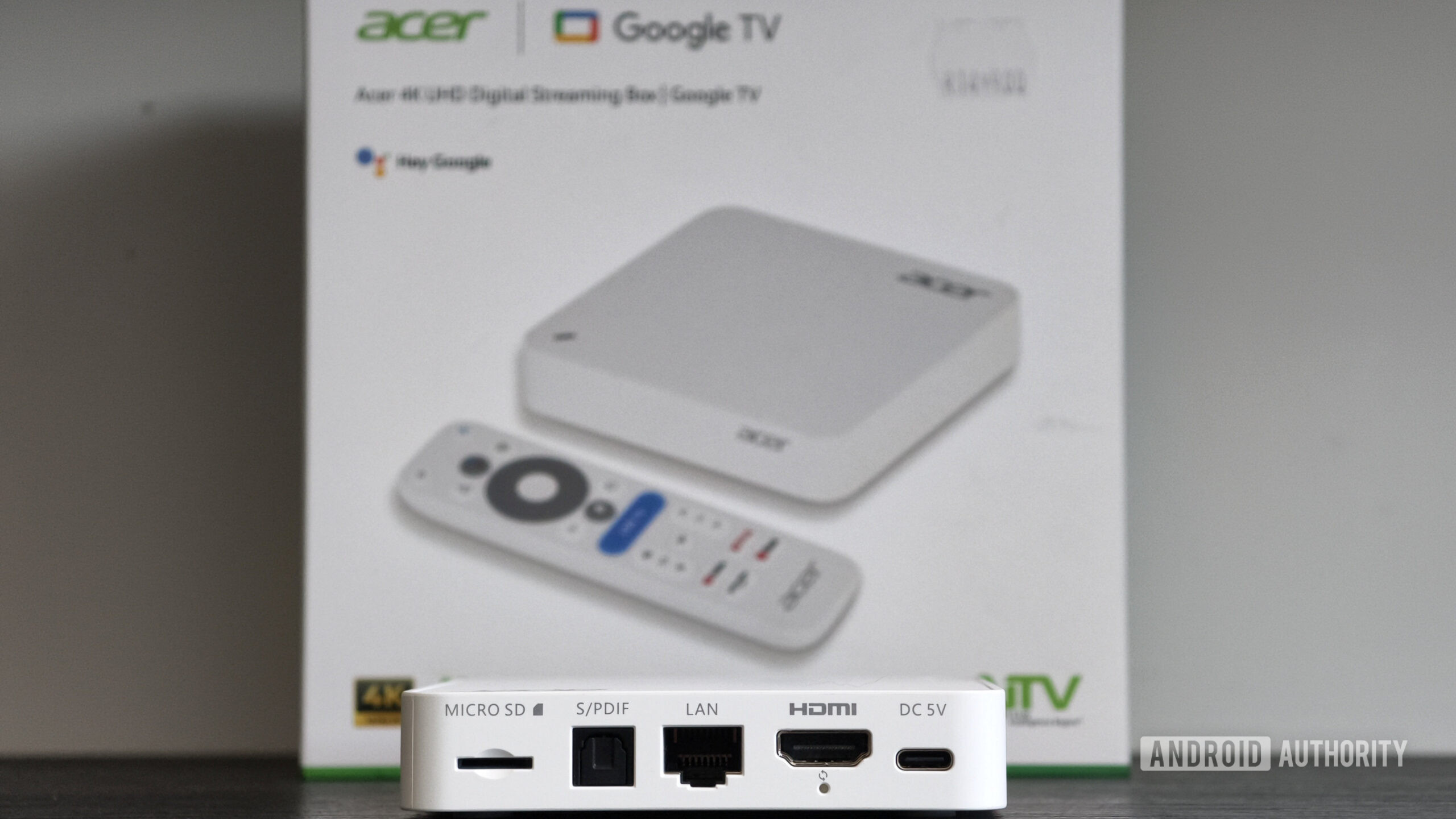
Easily my favorite thing about the Acer TV Box is the sheer number of ports. It’s equipped with two USB-C ports (one of which is devoted to power), a microSD card slot, a full-sized USB-A port, an Ethernet port, and an optical audio input. By contrast, my Shield TV Tube has a microSD card slot and Ethernet port, while the Google TV Streamer has a single USB-C port and an Ethernet port. It’s possible to add more USB-C or USB-A ports on the Google TV Streamer via a USB hub, but compatibility is hit-and-miss.
The Acer TV Box’s USB-A port is very handy for sideloading apps, as I can simply plug a flash drive into my TV box and install apps like SmartTube. By contrast, the Shield’s microSD card slot is awkwardly located, so I’m forced to unplug the HDMI cable to remove it. It doesn’t sound like a big deal until it is.
I also eyed these full-sized USB ports for local media playback, especially in light of streaming service fatigue and Plex acting up on my Shield. I usually plug a portable hard drive into the Xbox One if I want to watch locally downloaded movies or shows, so being able to plug into the TV box itself would be more convenient. Unfortunately, my old portable hard drives refused to work, although my 2011-era external hard drive with a separate power adapter worked fine. In the case of the former devices, they don’t even appear in Google TV’s storage settings menu.
The Acer TV Box offers plenty of I/O options, but USB-based storage expansion is really hit-and-miss.
This issue suggests that the TV box doesn’t supply enough power for typical portable hard drives. I’m not the first person to report problems with hard drives on Google TV boxes, but it’s still disappointing. I also had to format my external hard drive as, much like other Google TV gadgets, the Acer TV Box didn’t play nicely with its preexisting file format. As annoying as I found all of this, I’m still one of the lucky ones. This could be devastating for people who only have one portable hard drive and thought the Acer device would support it out of the box. For what it’s worth, Acer’s website notes that power is only available via the USB-C port. This suggests that some USB-C drives might work fine, but I don’t have any USB-C hard drives to test.
Otherwise, I don’t care for the optical audio port, but this is still a very useful addition for people who want a great audio experience. I also think the microSD card slot would ordinarily be redundant in light of the USB-A and USB-C ports. However, my aforementioned USB woes mean this is still a useful option, and it’s handy if you have a spare microSD card.
What about the rest of the Acer TV Box?

Hadlee Simons / Android Authority
Acer’s initial announcement pointed to a relatively powerful streaming gadget, but the company’s hastily revised specs reveal a slightly less impressive but still capable TV box. Gone is the originally announced Amlogic S905X5 processor and 3GB of RAM. Instead, Acer’s box has a less powerful Amlogic S905X5M chipset (2.5GHz quad-core Cortex-A55, Mali-G310 GPU) and just 2GB of RAM. At least the device still ships with a welcome 32GB of storage.
I was mostly happy with real-world performance, and I encountered little to no judder when opening apps or playing videos. I also haven’t encountered any stuttering in Prime Video or found that Netflix just refused to play content. That’s a relief, as I frequently encountered both issues on my Shield TV Tube.
Don’t want to miss the best from Android Authority?


In saying so, the Acer TV Box always stutters when opening the side panel on the home screen. I also noticed some stutter when quickly flicking through the settings menu. I’m not sure whether this judder is due solely to the measly amount of RAM, Google TV being a little too bloated for its own good, or a combination of the two. However, this does make me question whether the machine will run smoothly a few years down the line.
An extra gig of RAM would’ve really given me some peace of mind about long-term performance. I also asked my colleagues, and both Rita El-Khoury and Zac-Kew Dennis noted a similar side-panel stutter on their Google TV boxes (Xgimi projector and Chromecast with Google TV). However, Rita reported no such issue on her Google TV Streamer, which coincidentally has 4GB of RAM.
Another issue I have with the Acer TV Box is that it only runs a 32-bit version of the Google TV OS. This isn’t a surprise, as the vast majority of Google TV and Android TV boxes run a 32-bit OS. However, this means I can’t try relatively demanding emulators like Dolphin for GameCube and NetherSX2 for PS2. I’m not expecting great performance, but it’s still a real shame as the USB ports would enable quick access to my ROM collection.
The Acer TV Box mostly avoids my Shield TV Tube’s performance pitfalls, but core OS issues are hard to avoid.
Another problem I have with the Acer TV Box is Google TV itself. My NVIDIA Shield TV still runs Android TV, and Google TV lacks a couple of options seen on the other OS. This includes a recents menu and a persistent clock, with the latter requiring users to open the side panel.
Now, some users will note that Google TV handles tasks and memory management just fine, but it’s still annoying that I can’t simply close apps via a multitasking menu. This becomes particularly annoying when clicking a video recommendation on the main home screen. That’s because if you clicked this recommendation and then later launched the same app from its home screen icon, it would still open on the video recommendation rather than launching anew on the app’s main screen. This is especially irksome in Prime Video owing to its UI design. I can understand why the OS takes this approach, but do you know what would be better? If I could simply kill these apps via a freaking recents menu!
It’s worth noting that I got a 900MB update out of the box, but there’s no word on a future update policy. I’ve asked Acer for details on this, but the company hasn’t answered our question as of writing. Nevertheless, I’m not expecting a great update pledge, let alone anything close to NVIDIA’s impressive commitment.
Is it worthwhile for the ports alone?

Hadlee Simons / Android Authority
The Acer TV Box is an intriguing Google TV gadget, especially after spending over five years with the well-regarded NVIDIA Shield TV Tube. I’m really glad to have a variety of ports at my disposal, as the overabundance of streaming services has meant that offline playback is taking a bigger priority for me in 2026. However, Acer and Google shot themselves in the foot due to confusing USB storage support and storage format limitations. Toss in the 32-bit OS (a disappointment for gamers), Google TV missing some Android TV features, a mere 2GB of RAM, and the murky update policy, and this isn’t the premium TV box you’re looking for.
The biggest problem with the Acer TV Box is undoubtedly availability, as it’s only available in South Africa, and there’s no word on a wider launch. So most people on the hunt for a box with extensive I/O options should look elsewhere. Expect to pay a recommended price of 1,499 South African Rand (~$91) in the market, although it’s also available from some retailers for 1,299 South African Rand (~$79).
Still, there’s enough to like about the Acer TV Box that I do hope it launches in more markets. The variety of I/O options is very welcome, even if Google TV and Acer fall short in other areas. I’m also glad to see smooth video playback after years of dealing with issues on my Shield TV Tube. The addition of 32GB of internal storage along with several remappable buttons on the TV remote also means I don’t quite regret my purchase.
Otherwise, there’s no shortage of great Google TV boxes on the market. The Walmart Onn 4K Pro is our top pick if you value storage expansion, owing to its USB-A port. Meanwhile, the Google TV Streamer is another great choice owing to plenty of RAM and storage, while you can still add more storage with the aid of a USB-C hub. The 2019 Shield TV Pro (not the Tube model) is also worth a look after all this time, as it packs a healthy level of performance, two USB-A ports, and a ton of features.
Thank you for being part of our community. Read our Comment Policy before posting.
 By
By