

The Nebula P1i keeps things simple on paper, but its unique, flippable speaker design is genuinely impactful. Between the adjustable audio, built-in Google TV, and quick setup, the device ends up being a more practical pick than its spec sheet might suggest. You’ll need to keep the lights down and a power outlet nearby, but for casual nighttime screenings, it’s a compelling budget pick.
I’ve tested enough portable projectors to know what I’m getting into. The package usually includes a solid 1080p image, built-in Google TV, and integrated speakers. This spec roundup applies to the budget-friendly Soundcore Nebula P1i ($295 at Amazon) as well, but after a week with the device, its notably unique (and somewhat quirky) speaker design sets it apart.
A small satellite with a practical purpose

Kaitlyn Cimino / Android Authority
Soundcore’s Nebula lineup — previously Anker Nebula, now officially under Anker’s Soundcore brand — already leans a little cosmic (Capsule, Mars, Cosmos), so a projector that looks like a small satellite feels right.
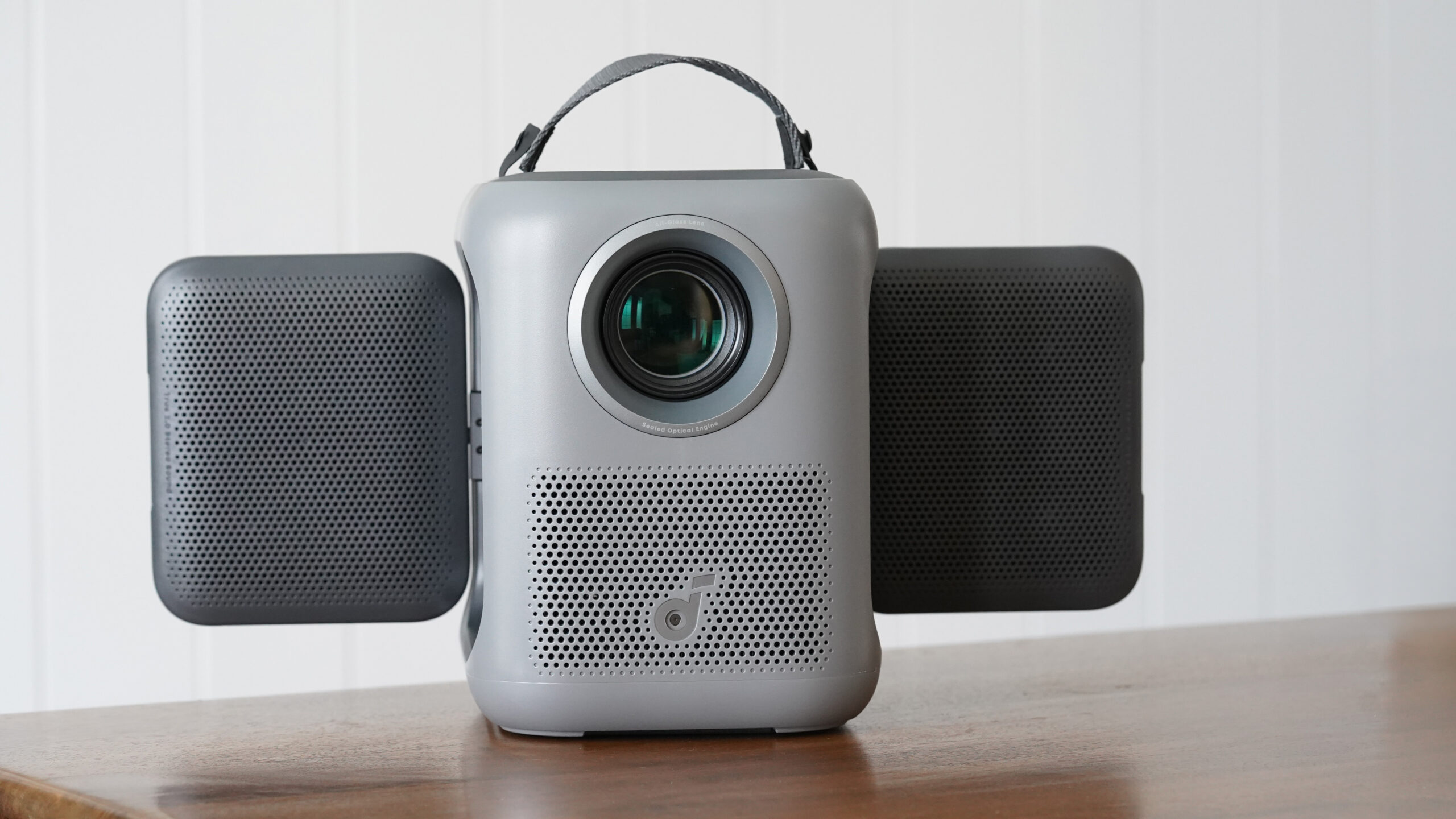
The device’s standout feature is its two hinged speakers that unfold from each side. Though generic in overall build when folded up, with its speaker panels extended, the P1i looks like it could slip into orbit and start taking pictures of the Milky Way. Or maybe I’m just too deep into Project Hail Mary promos.

Kaitlyn Cimino / Android Authority
More importantly, the hinged parts aren’t just for show. Each one houses a 10W speaker that flips outward and rotates, offering a highly adjustable audio experience. Extended, the speakers can tilt downward, flip upward, or rotate 180 degrees to direct sound backward. The design makes setup more versatile while delivering an impressive audio experience that I’ll get to more below. From a build standpoint, they’re attached firmly enough to hold position, but are also very easy to adjust.
The rest of the projector’s vertical, rectangular build is more straightforward. Compared to truly compact builds like the Mogo 4, it isn’t the most portable design I’ve seen, but at around 7.3 pounds, it’s still easy to move from room to room.
The carrying handle is a nice touch, especially because I wouldn’t throw it in a bag. Originally, I had assumed a little extra weight would help ground the speaker, especially when the speakers are extended, but I actually found it slightly less sturdy than I expected. When the kickstand on the bottom is opened to give the device a 15-degree tilt, it’s fairly wobbly. It’s not detrimental, but you’ll notice your image shake if a stampede of children runs by.

Kaitlyn Cimino / Android Authority
The biggest design limitation is the lack of a built-in battery. The P1i needs to stay plugged in, which keeps it closer to home than some smaller projectors. That’s a bit of a miss, especially because everything else about the design makes it feel like the perfect all-in-one option for an outdoor movie night. It doesn’t help that the included power cable is noticeably short.
Best after hours

Kaitlyn Cimino / Android Authority
As mentioned, on paper, the Nebula P1i is largely typical in performance specs. It features 1080p resolution, an LED light source, and up to 380 ANSI lumens of brightness. Soundcore also touts some longevity details, like all-glass lenses, a fully sealed optical engine, dust resistance, and a built-in cooling system, all of which should help the device last over time.

Kaitlyn Cimino / Android Authority
In a dark room, it holds up well. Streaming content looks sharp, colors are balanced, and nothing stands out as completely distracting. It’s not pushing contrast or HDR like a high-end model, but it avoids looking flat, which is enough for casual viewing. I scratched my recent space itch with clips of everything from The Martian to Apollo 13, and all of it looked attractive in controlled lighting. I did notice very subtle softness in the corners, especially at larger sizes, though it improved the more I was able to align the projector straight on. It can technically stretch up to around 150 inches, but it looks its best in the 80 to 120-inch range, especially once you factor in the limited brightness.
In a dark room, the Nebula P1i’s image is good enough for casual screenings, but it suffers in ambient light.
Ambient light is, unfortunately, another story. In a mildly lit room, contrast drops off quickly, and darker scenes lose detail. Dune Part 2, for example, is decidedly hampered at 150 inches in the daylight, so I’d be inclined to wait for nighttime to start anything cinematic. Back on the pro list, setup is quick. Autofocus and keystone correction handle most adjustments, and the process reminds me of the eye exams you get at the ophthalmologist’s, including how quickly it goes. I could move the unit, plug it in, and start watching without much delay, which matters when you’re about to start Interstellar at 11 PM.
Audio is where the P1i makes its strongest case. The dual 10W speakers with Dolby Audio are genuinely great for a projector this size, and the design offers easily one of the best setups I’ve tested. What makes the biggest difference is how the sound is directed. Spreading the speakers outward delivers noticeable punch and carries soundtracks and dialogue more effectively across large spaces. The ability to tweak each panel’s direction massively impacts how immersive the projector feels.
The flippable speakers greatly impact how well the speaker distributes sound.
In short, I would be very unlikely to pair up a sound bar or Bluetooth speaker. My only comment would be that there aren’t a ton of control settings, like amping up dialogue, for example, which can often be found on alternatives. Bass isn’t theater-level, and lower-end detail drops at moments, but that’s not unexpected at this size.
The TL;DR on performance: the overall package is good for the price if you are likely to use this projector at night or in dark rooms, but the speaker design is truly impactful.
An all-in-one streaming device

Kaitlyn Cimino / Android Authority
The P1i runs Google TV, and it delivers a complete streaming experience out of the box. Apps like Netflix, YouTube, and Prime Video load and play as expected, which isn’t always the case on a lot of cheaper portable projectors. Once I signed in, the P1i behaved like a proper streaming device, with recommendations, watchlists, and quick app switching all in place. I love when projectors feel like my TV, because I fall straight into whatever I was already watching.
Built-in Google TV makes the Nebula P1i a more attractive all-in-one package.
That puts it in line with the rest of Nebula’s recent lineup. The higher-end Nebula P1 also runs Google TV, along with several of the brand’s newer models, so this isn’t a cut-down experience to hit a lower price point. In contrast, a lot of competing portable projectors in this range still rely on basic Android skins, which usually means you end up plugging in a Fire Stick or Chromecast. Around back, the P1i also features the essentials for added connectivity, including HDMI, USB-A, and AUX ports if you want to plug anything in.

Kaitlyn Cimino / Android Authority
In day-to-day use, everything runs through the remote. There’s only a power button on the projector itself, so navigation, playback, and settings all happen through the remote or the app. That ends up working in the P1i’s favor. The device can feel a bit wobbly if you start pressing on it, especially with the speakers extended, so not having to tap around on the body is probably for the best anyway. If you do lose the remote, the app is there as a backup, but the remote is much quicker and more precise.
Soundcore Nebula P1i review verdict: Should you buy it?

Kaitlyn Cimino / Android Authority
The Nebula P1i isn’t the brightest option in this category, and it’s less portable than battery-powered picks like the XGIMI MoGo 4 ($499 at Amazon). Even within Soundcore’s own lineup, the higher-end Nebula P1 ($639 at Amazon) offers more power and a more premium build. Yet, the quirky, flippable speakers make the projector easy to place, easy to listen to, and fairly flexible in real-world use. More importantly, it’s a good deal cheaper.
The Nebula P1i is an affordable pick with limited brightness but a very unique (and effective) approach to sound.
You’ll need to keep it plugged in, which limits the “portable” pitch, and the image works best at night, so this won’t replace a full home theater setup or your living room TV. It’s more likely to be something you pull out for movie night and move around the house depending on where you want to flop down and watch. To that end, the built-in Google TV goes a long way in keeping setup streamlined and effortless.
You can spend less on something like the Yaber T2 Plus ($309.99 at Amazon) and get battery power in return, but most cheaper options won’t offer the same level of refinement, especially when it comes to sound and setup. The P1i lands well below the price of something like the Nebula P1 while still delivering the same core idea in a simpler, more approachable way.
MSRP: $369.00
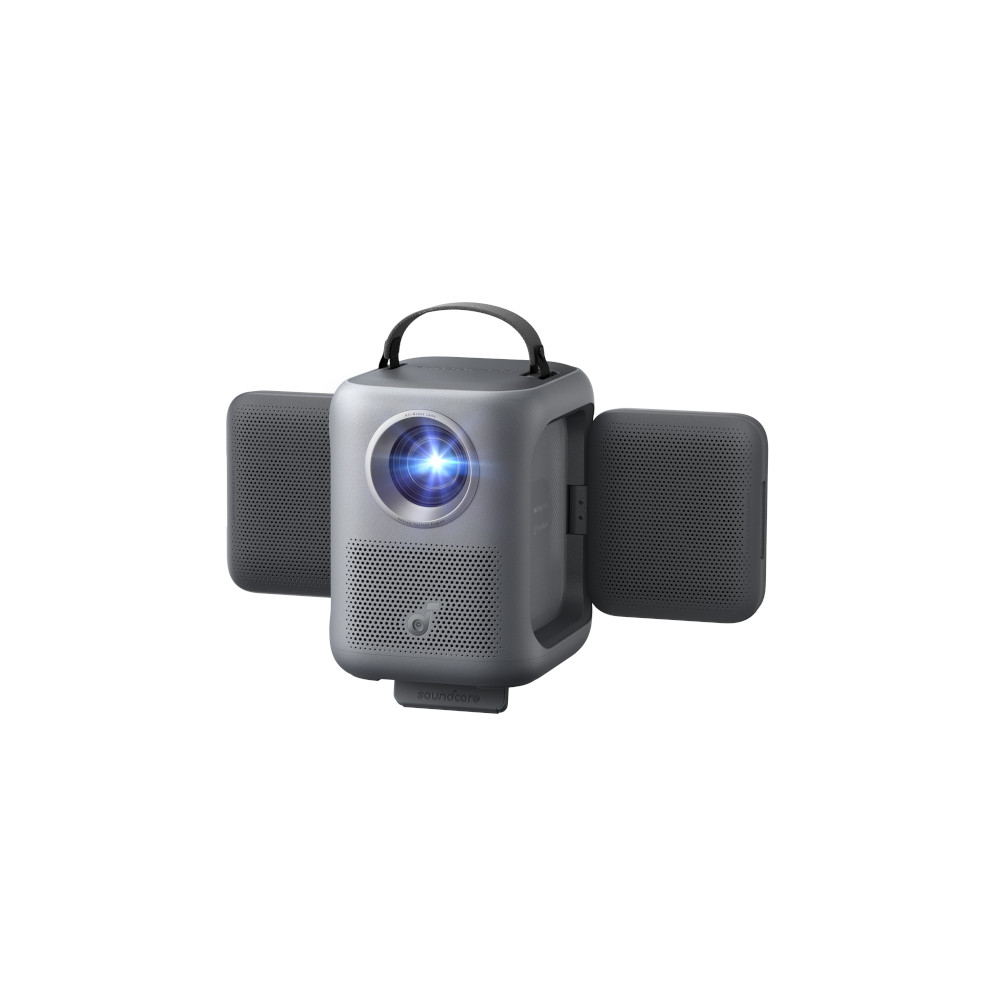
The Soundcore Nebula P1i is a compact 1080p portable projector with Google TV, 380 ANSI lumens brightness, and dual 10W flippable Dolby Audio speakers — paired with auto focus/keystone setup and an all-in-one design built for easy, flexible home or outdoor viewing.
Positives
- Unique, flippable speaker design
- Reliable autofocus and keystone correction
- Built-in Google TV experience
- Thoughtful carrying handle
- Works reliably in dark rooms
- Approachable price point
Cons
- Limited daytime use/struggles in ambient light
- No built-in battery and short power cable
- Bulkier than ultra-portable competitors
- Corners lack sharpness at larger scale
Thank you for being part of our community. Read our Comment Policy before posting.
 By
By