

Megan Ellis / Android Authority
While I’ve used the Gemini app for a series of tasks, from restoring images to suggesting new music, I didn’t realize how useful scheduled actions could be until I tried them. As someone who is incredibly forgetful, getting the AI to perform certain actions without manual input has made a series of tasks easier for me.
Have you tried scheduled actions in Gemini?
8 votes
What are scheduled actions in Gemini?

Megan Ellis / Android Authority
Scheduled actions are automated prompts in Gemini, allowing the chatbot to generate responses at specific intervals. For example, you can get it to generate weekly or monthly reports, summarize news daily, or give you updates on your schedule.
However, access to this feature depends on your account. If you have a personal account, you can only use scheduled actions on the Google AI Pro or Ultra plans. For work and school accounts, the feature is limited to specific Google Workspace editions. You will also need to sign in to Gemini Apps.
If there is a specific prompt you would like to repeat at a regular interval, you can set this up in a chat with the AI. I usually begin with the prompt I would like so that I can see exactly what Gemini’s response would be, tweaking the instructions if necessary. I then ask it to repeat this action — for example, by asking it to “repeat this every Tuesday at 10am”.
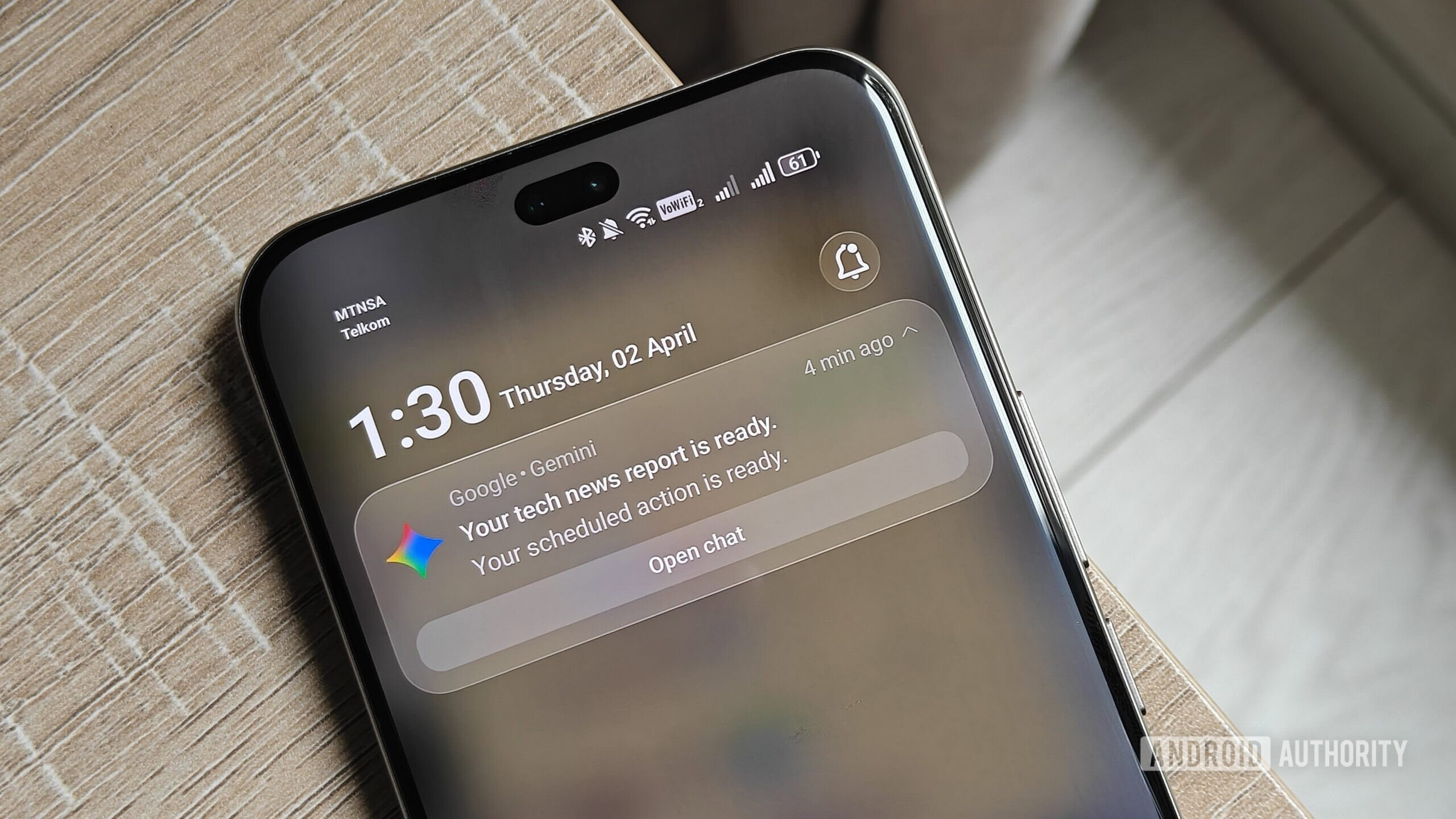
If you use the Gemini mobile app, you will receive a push notification when your scheduled action is ready. Otherwise, the newly generated response will appear at the top of your chats. You can see that new content has been added based on the blue dot that appears next to the chat.
I didn’t think scheduled actions would work for me, but now I’m hooked

Megan Ellis / Android Authority
When I first set up a scheduled action, it was out of curiosity more than anything else. However, after weeks of using the feature, it has saved me a bunch of time by automating certain tasks I usually forget about. It has become one of my favorite Gemini tricks.
The first task I set up was generating a weekly report of consumer tech news, with sources cited. While keeping up with technology is part of my job, I tune out of announcements outside of my working hours since I’m usually catching up on chores or trying to relax.
This means that I occasionally miss new features or products that I’m not directly covering as part of my assignments. Relying on Google Discover hasn’t worked well either, since it keeps me in a bit of a bubble.
One way I use Gemini’s scheduled actions is to keep up with technology news that I may have missed outside of work.
To fix this, I started getting Gemini to generate a summary of the past week’s announcements. This has helped me stay on top of news that I may have missed. Over time, I have tweaked the report to include topics like open-source software, changes to interoperability for major platforms, and any new trends to be aware of.
While I still have to spend a fair amount of time reading news and keeping up with software changes, the report from Gemini helps address any blind spots I may have. Since I focus on Android for most of my work, it has kept me informed of changes and announcements for Apple products.

Ryan Haines / Android Authority
The second automated routine I love is my weekly series recommendations. I’ve been in too much pain over the last few months to pursue my gaming hobby, so I spend most evenings watching series on the couch. As a result, I run out of things to watch fairly quickly, especially since I can be a bit picky.
I also use a scheduled action to regularly suggest new shows to watch, which saves me from having to read generic articles.
Tired of reading dozens of articles on what to stream, I decided to set up a scheduled action for weekly recommendations. The benefit of this is that I can tell the AI what genres I enjoy, provide a list of shows I have already watched and liked, and ask for new recommendations based on those preferences.
Whenever Gemini suggests something that sounds interesting, I can get it to add the show to a watchlist that it saves in Google Keep. It automatically updates this list when I tell it to add a new item, creating an extremely smooth process.
Don’t want to miss the best from Android Authority?


Part of me does wish that this feature was available on free versions of Gemini, with limits on the frequency of scheduled actions. After all, free users have access to a limited number of prompts using Gemini’s Pro model.
The big upgrade that scheduled actions provides is the convenience of the feature, which is useful if you’re forgetful like me.
It’s possible to set up automation using a platform like Zapier, but this does limit you to specific models, which affects output. However, if you’d like to tinker with automation without a Google AI Pro plan, it’s one way to do it.
Thank you for being part of our community. Read our Comment Policy before posting.

 By
By