

Dhruv Bhutani / Android Authority
I’ve spent years turning my house into a smart home. I have automated blinds, local-first security cameras, color-changing bulbs, motion sensors, AI integrations, and a thermostat that knows when I’m home before I even walk through the door. But every time a friend stays over for the weekend, the entire high-tech illusion falls apart. I either have to control everything for them or hand over my unlocked phone just so they can turn off the bedroom light. Who’d have thought that a hyper-personal smart home would be precisely that: a bit too personal.
My smart home works perfectly, until someone else walks in.
The reality is that Google Home and its competitors have a massive feature gap when it comes to guests. You are either a permanent member of the household with sweeping powers to delete devices, view security cameras, and change the lights in rooms to which you shouldn’t have access, or you have next to no access at all. There is no middle ground. With smart home platforms maturing, I’ve been waiting for a full-fledged guest mode to become a priority for mainstream ecosystems. But since that still remains a distant dream for big tech, I decided to take matters into my own hands and build the temporary, limited-access system that my smart home needed. It’s incredible.
Do you let guests control your smart home?
1 votes
Where smart homes fall apart
Before I switched over to Home Assistant, my smart home centered around Google Home. And if you’ve used Google Home, you know the struggle of adding a temporary visitor or guest to your setup. The app expects you to send a formal invite to their Gmail account. Once they accept, they aren’t just a guest anymore; they are given more or less full access to your digital life. They can see your security camera feeds, can change up your carefully tuned routines, and might even get notifications about your doorbell even when they’re no longer at your home. Plus, you have to manually go ahead and revoke access.
A smart home should adapt to guests, not expect them to adapt to it.
It’s an all-or-nothing approach that makes no sense. When you stay at a hotel, they don’t give you a master key to every room and the security office. They give you a key card that works for your door, for your stay, and then it expires. There is no reason for my smart home, which is supposedly more advanced, to be stuck in a binary state such as this. It’s a massive friction point that keeps smart home integration from feeling like a natural part of the house for me and others who frequently host guests.
The problem gets worse if your guest is an iPhone user. In a Google-centric home, you’ll have to get them to download the Google Home app, sign in, and navigate an unfamiliar interface. Now, you might just say, “Dhruv, that’s why you keep physical switches as a redundancy.” Well, the answer to that is that I designed my home for my own lifestyle, and most of my physical backup switches are conveniently tucked away inside cabinets to maintain a clean aesthetic. If I asked guests to access those, they’d end up fumbling around, rummaging through drawers, or, worse, sitting in the dark because they didn’t want to bother me. A smart home should adapt to the people inside it, not the other way around.
HAPass is smart home guest access done right

Dhruv Bhutani / Android Authority
Because I use Home Assistant as the backbone of my setup, I had the flexibility to look for a better way. A few weeks back, I stumbled across a project called HAPass, and it’s exactly what the big platforms should have implemented years ago. It’s a tool that lets you generate self-expiring, limited-access dashboards for anyone who walks through your door or, for that matter, even a family member who needs a simpler tool with limited access to navigate the home.
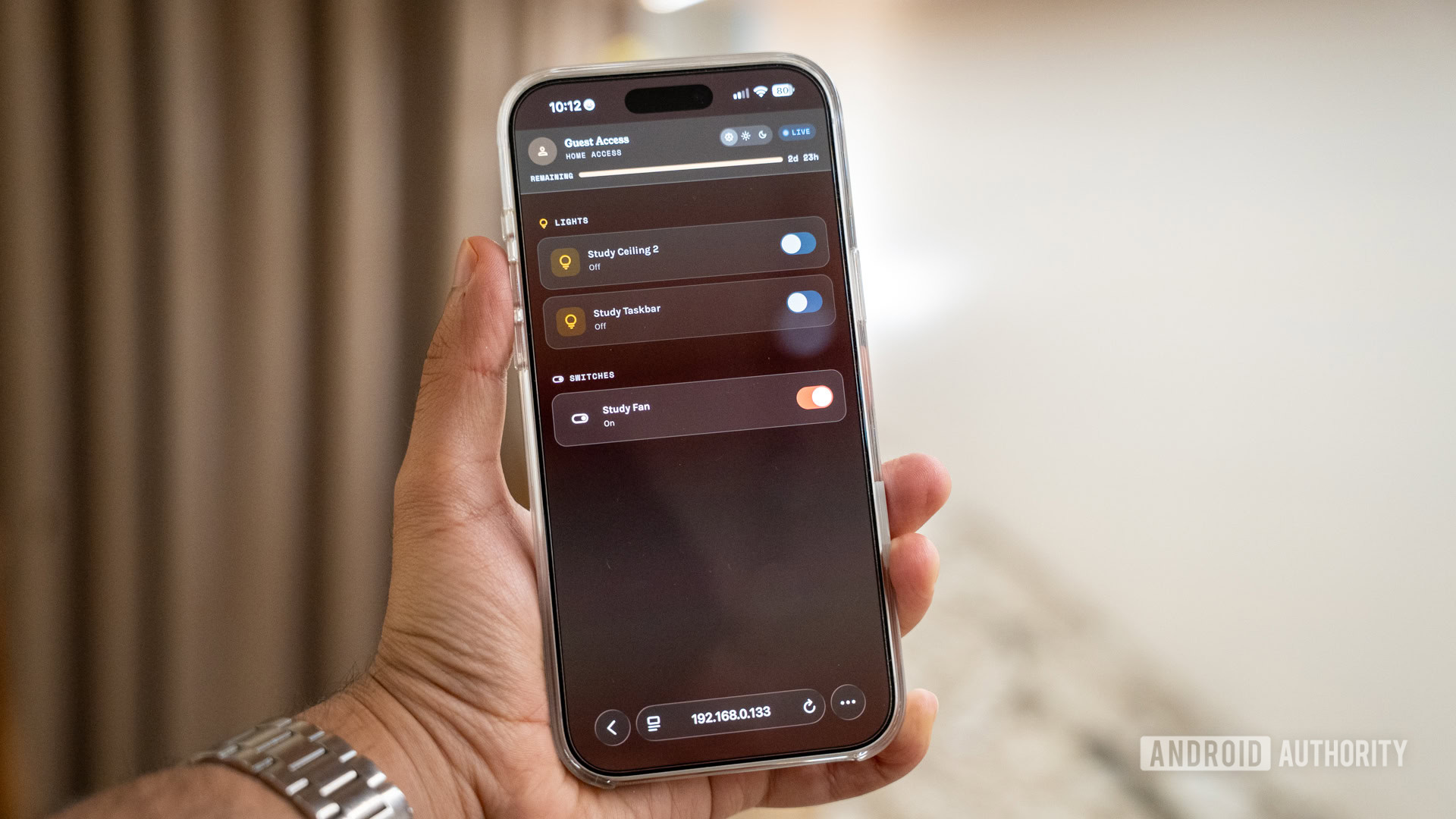
The beauty of this system is its simplicity. I don’t need to ask for a guest’s email address. I don’t need them to download an app or sign up for an account. I just pick the specific lights, fans, or locks I want them to control, set an expiration date, and hit “create.” The result is a simple link or a QR code that gives them a clean, web-based remote right on their phone. It follows the hotel key card philosophy but brings it to any Home Assistant-powered smart home.
Guests get exactly what they need, and nothing they shouldn’t.
One of the best things about this DIY approach is the granularity. In the Google Home ecosystem, if I give a person access to the living room, they will see everything in that zone. I don’t have an issue with giving them access to lights and the thermostat, but there’s no reason they should be able to see a security camera feed or access my security system. With my custom HAPass setup, I can be much more intentional.

Dhruv Bhutani / Android Authority
When my parents stayed over recently, I created a dashboard that only featured the guest room lights, the hallway lamp, and the kitchen coffee maker. They didn’t need to see my office setup or have access to the connected washing machine for a weekend stayover. By creating a whitelist of entities, I ensure that my guests have exactly what they need to be comfortable without feeling overwhelmed by a list of 50 different devices they don’t recognize.
This level of control is vital for privacy, too. I don’t necessarily want every weekend guest to have access to the smart lock on my front door, the aforementioned security cameras, or even the smart plug connected to my wine cooler. HAPass lets me curate a smart experience, giving my guests a playground that is safe for them and secure for me.
A large part of building a smart home is convenience, but there’s no denying there’s a coolness factor attached to it, too. Years later, I still feel like I’m stepping into a sci-fi movie set when my home automatically deploys my preferred settings when I enter a room. Compared to that automation, a QR code might not sound as impressive, but I disagree. I printed out a small card with a QR code and left it on the nightstand in the guest room.
For the first time, I don’t have to explain how my house works.
When my friends scan it, they are instantly greeted by a sleek interface in their smartphone’s browser. No “OK Google” shouting matches at 2 am and definitely no fumbling for a light switch in the dark. Just a simple, easy-to-understand UI that lets them adjust the essential settings they’ll need access to. And because I set the link to expire after 48 hours, I don’t have to worry about revoking access later. The digital key stops working when they leave. Or if they decide to stay a few days longer, I can just extend the pass.
Perhaps the strongest selling point is that the system is entirely platform-agnostic. It doesn’t matter if my guest is using the latest Android flagship, an iPhone, or even a tablet. As long as they have a browser, they have all the same access. This platform-agnostic approach is something Google and Apple will likely never fully implement, yet it’s the only way to make a guest experience truly seamless.
Smart home guest access is broken by design

Dhruv Bhutani / Android Authority
It’s frustrating to realize that a single enthusiast-driven project can solve a problem that multi-billion-dollar companies have ignored for a decade. So why is Google Home still so broken for guests?
A big part of it comes down to the walled garden mentality. Google and Amazon want every person who interacts with a smart device to be a registered user in their ecosystem. They want the data, the account sign-up, and the long-term engagement. A simple, anonymous web link for a guest doesn’t help with that. It prioritizes the user experience over data collection, and in the world of big tech, that’s a rare trade-off.
Apple isn’t much better. While HomeKit is often praised for its local control and security, its guest access is even more restrictive, requiring everyone to be in the Apple ecosystem to even get an invite. If you have an Android user visiting an all-Apple household, they are effectively locked out of the smart home entirely.
Big tech wants users, not guests.
Security isn’t enough of a justification, either, since most people end up just passing over unlocked phones to avoid the hassle of the invite system. HAPass, on the other hand, proves that the technology isn’t the limitation; it is a matter of willingness. It uses the same secure APIs that Home Assistant uses, but it wraps them in a temporary token that is only valid for a specific timeframe. It’s as simple as that. Larger ecosystem players have the resources to build this tomorrow if they wanted to, but they have very little incentive to.
After using this setup for a few weeks, I can’t imagine going back. It has removed the awkwardness of explaining how to use my house. When people arrive, I just point to the QR code. It’s become a conversation starter, but more importantly, it has made my smart home feel like a professionally put-together place rather than something I hacked together over a few weekends.
I’ve even started getting creative with it. If I have a repair technician coming over while I’m out, I can generate a link that only works for three hours and only gives them access to essential controls and the front door lock, instead of opening up my entire smart home to a stranger. This ensures that they can complete their work without me needing to share permanent digital keys or compromise my home’s security.
The missing piece in every smart home

Dhruv Bhutani / Android Authority
If smart homes are ever going to move beyond the enthusiast crowd and become a standard part of every household, they need to handle guests gracefully. A home is a social space where people come and go. It could be visiting family and friends, or just a babysitter. And there’s just no need to expose your entire smart home to users who just need to change a few lights.
A home is a shared space. Smart homes should act like it.
My experience with HAPass has completely changed how I think about my smart home. It’s made it significantly easier for anyone to live in and live with my smart home. And, honestly, I’ve noticed that this simple quality-of-life addition makes them appreciate it a whole lot more.
I’m happy I was able to build this myself with Home Assistant, but I shouldn’t have had to. The smart home is supposed to make life easier, and that should include the people we invite into our homes. But, for now, if you want a guest-friendly house, you’re going to have to follow the enthusiast’s path. And HAPass paired with Home Assistant might just be the best approach.
Don’t want to miss the best from Android Authority?


Thank you for being part of our community. Read our Comment Policy before posting.
 By
By