

Edgar Cervantes / Android Authority
TL;DR
- “Help me schedule” launched last year as way to partially automate meeting coordination between a pair of participants.
- Google’s now expanding the tool to support more than just two people in a meeting.
- Workspace users should get access over the next two weeks.
A job where you have to regularly attend meetings can be bad enough — but it’s so much worse when you’re the one tasked with coordinating them in the first place. By the time you think you’ve confirmed everyone’s availability, people have already stated making other plans, and you’re back to square one. Last year, Google announced an incredibly helpful-sounding tool for taking a lot of the headache out of scheduling meetings — and now it’s getting a whole, whole lot better.
Don’t want to miss the best from Android Authority?


Most of our meetings don’t begin life right in Google Calendar, but are initially proposed over email. So back in October, Google launched its “Help me schedule” tool for Gmail. The idea is that when Gmail saw you were writing about a meeting it could offer to find some compatible time slots, saving you that legwork. Really, the one big problem with it is that it only supported one-on-one scheduling, and couldn’t be used to coordinate groups.
Well, fast-forward to now, and Google has finally cracked that nut: “Help me schedule” now supports three or more meeting participants.
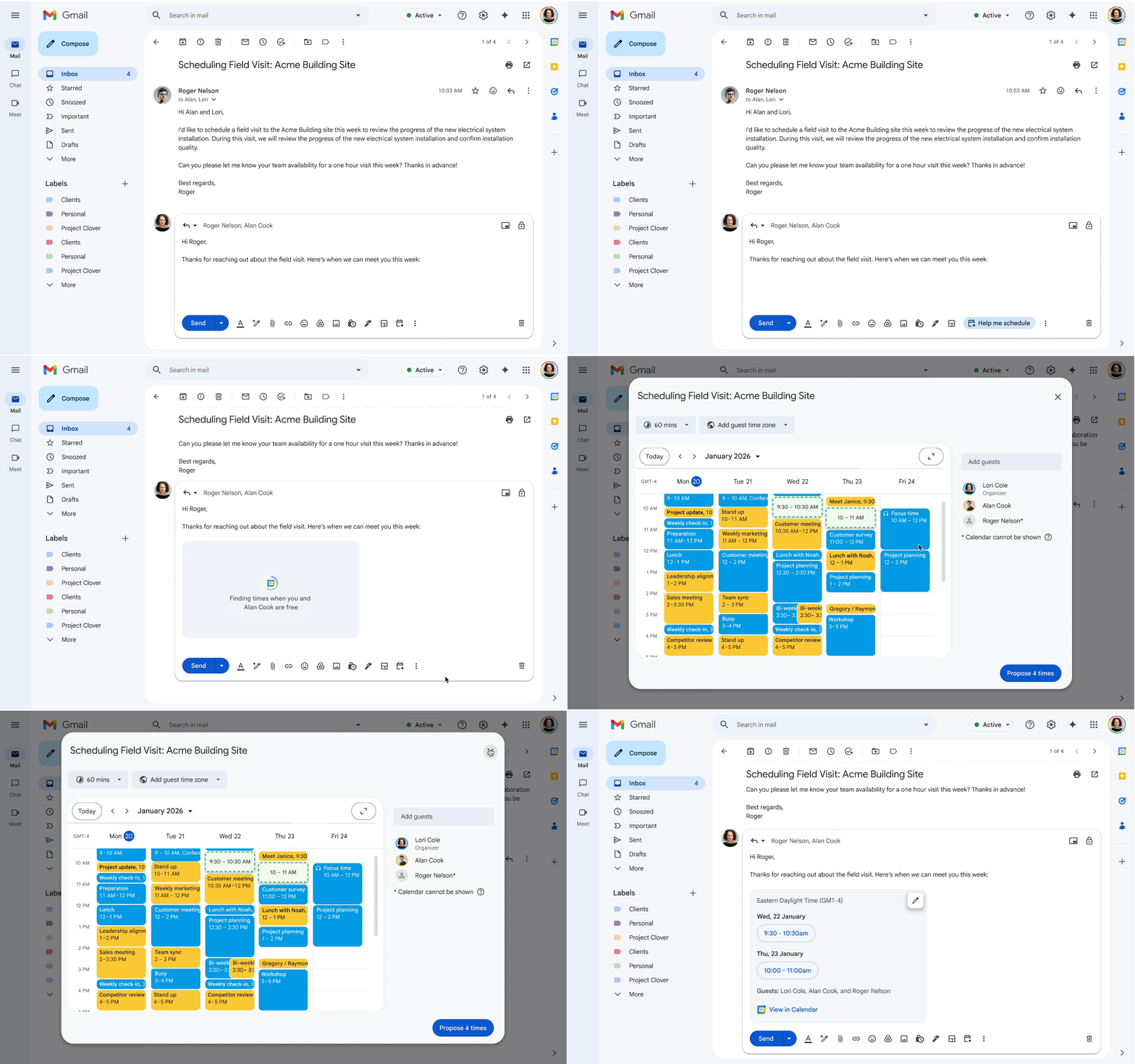
Obviously, you’re going to need access to your colleagues’ calendars for this to actually be useful, and the feature is targeted at Google’s business and enterprise users. But seeing as that includes a whole lot of us, this is one upgrade that sounds incredibly useful.
While Gmail will default to looking for meeting times that work for everyone copied on the email, the tool isn’t restricted to just those participants, and you can always manually add more. The primary recipient gets sent the options that work with the group, and then once they choose one, everybody gets sent a Calendar invitation for the designated time.
If you’re a Google Workspace user, look for this one landing soon, with access expected to hit everyone by the end of the month.
Thank you for being part of our community. Read our Comment Policy before posting.

 By
By