
Gestures on a smartphone like a Google Pixel device can be really handy. They’re offered to make it simple to start actions like opening the camera, viewing the screen, silencing the device, or even accessing your digital assistant, all without having to click a button or even speak a command.
There are two main types of gesture controls for Pixel phones. The most basic is Navigation gestures, which, as the name implies, use gestures rather than button sequences to navigate menus and screens. The second is quick-access Gestures, which let you perform a specific motion to achieve a predetermined result. You can enable or disable the first and enable, disable, and customize the second.
How to enable or disable Navigation gestures
Navigation gestures allow you to do things like swipe up from the bottom of the screen to go back to the Home screen or swipe up and hold to switch apps. You can also swipe from the left or right of the screen to return to the previous page.
If you prefer not to use these gestures, the alternative is three-button navigation. With this, you’ll see buttons at the bottom of the screen for go back, Home, and switch apps. Those who might have dexterity or mobility issues might prefer using three-button navigation instead.
1. Go to Settings.
2. Select System.
3. Select Navigation Mode.

4. Tap the dot to the left of the Three-button navigation to switch from Gesture navigation. You’ll instantly see the three virtual buttons pop up at the bottom of the screen, and gesture controls will be disabled. Conversely, tap the dot beside Gesture navigation to switch from Three-button navigation to Gestures if you find you prefer them.

5. When using Gesture Navigation, you can also customize the experience. Select the Settings wheel on the right of the option.
6. Choose if you want the swipe up motion from the bottom corner of the phone to activate your digital assistant by sliding the slider to the right. You can also use the sliders to adjust the left edge and right edge back sensitivity based on your comfort level and preference.
7. In the main Navigation Mode menu, you can also turn Circle to Search on or off. To use Circle to Search, simply circle, highlight, scribble on, or tap an item or person on screen to instantly learn more about it or them. If you’d prefer not to use this feature, just tap the slider to the left to turn it off.

How to enable or disable system Gestures

Other Gestures are basically motion-based, quick access to functions that you might use frequently. You can turn these off if you prefer, or visit the menu to see what else they can do and tweak each one to your liking.
1. Go to Settings.
2. Select System.
3. Select Gestures and go through each one to see what you can adjust.

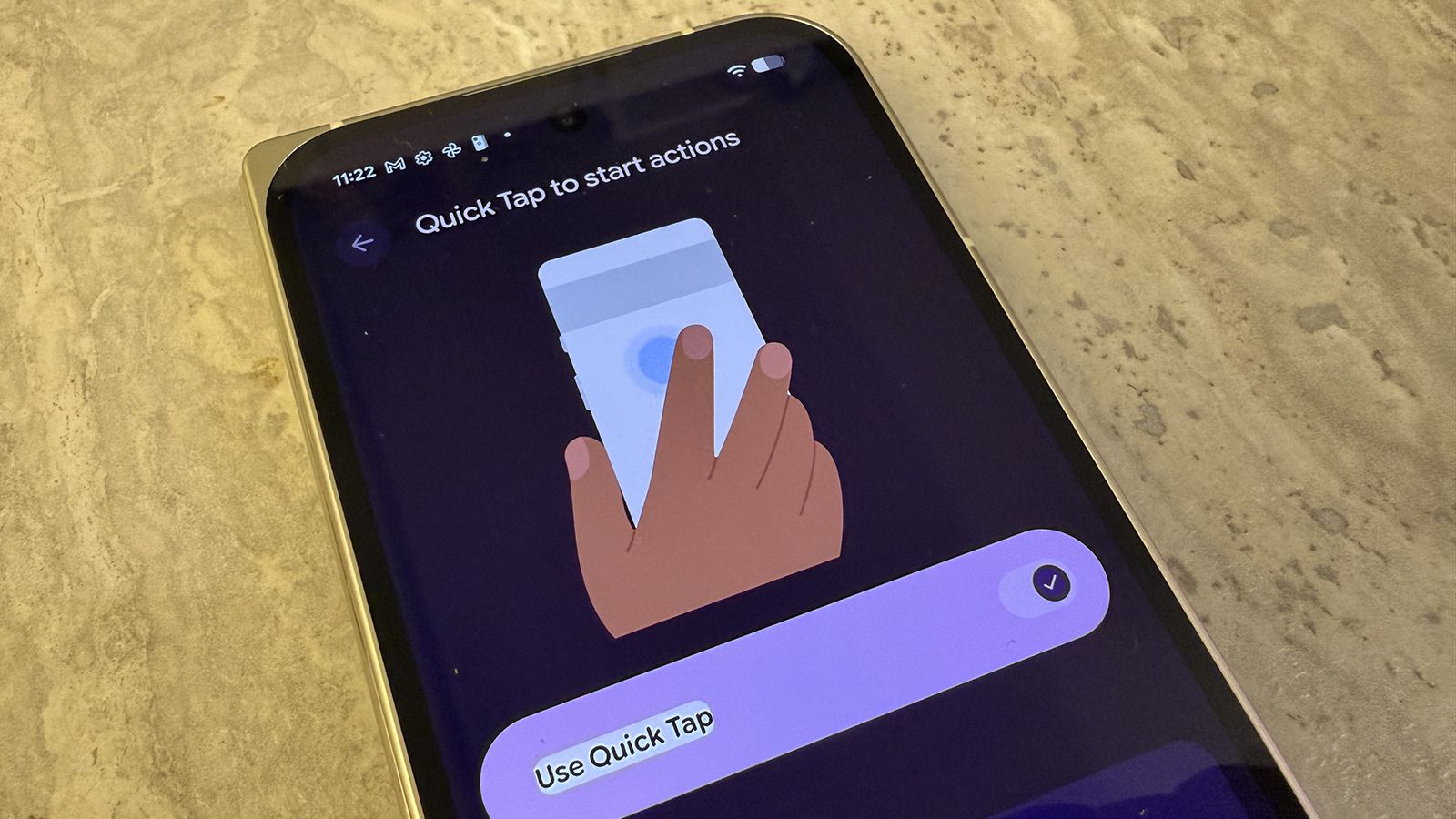
Quick Tap to start actions: Turn this on by tapping the slider to the right. From here, you can choose what happens when you tap the back of the phone twice. Options include Take screenshot, Access your digital assistant, Play or pause media, See recent apps, Show notifications, Toggle flashlight, or Open app. For the latter, select the scroll wheel to the right to choose which specific app you want it to open.
If you find you’re often inadvertently back-tapping the phone, you can adjust the strength as well to turn on Requires stronger taps.

Double press power button: Choose to use or not use this. If you use it, the feature can open either the Camera or Wallet.
Flip camera for selfie: Turn this on if you want to be able to double-twist the phone in the camera app to switch back and forth from selfie to back camera mode. Note: it might take a few tries for you to get the gesture right, or you may have to restart your phone. But it does work.

Tap to check phone: Turn this on to be able to check the time, notifications, and other pertinent information by simply tapping the screen to wake it up. This won’t unlock the phone, but will show useful information on the lock screen.
Lift to check phone: Use this instead of or in addition to Tap to check phone. The gesture means you can also lift the phone to see pertinent details without even having to tap the screen.

Flip to Shhh: If you find you often need to quickly silence your phone, turn this feature on. As soon as you position the phone face down on a flat surface, it will vibrate and automatically silence the device.
Press and hold power button: You need to keep this option active, but you have the choice of having the gesture activate either the Power menu or Digital assistant. You can use the slider to adjust the press and hold duration, from Short to Long. If you opt to set this to activate your Digital assistant, which is ideal since you likely summon it more than you turn the phone off, Power menu access is through pressing the Power and Volume Up buttons at the same time.
Enjoy gesture controls
Gesture controls on the best Google Pixel devices are useful, affording quick and easy access to important functions, simplifying operation, and customizing the experience. Most other phone manufacturers have similar features and gesture controls, too. It’s a pity you can’t activate both Gesture navigation and three-button navigation at the same time. But most people will prefer Gesture.
For other gestures, I like quick tap for taking screenshots, something I do often. Double-pressing to open the camera is handy, but if you use your digital wallet a lot, you might find value in switching to that. I love the Flip to Shhh feature as well, perfect if you’re in a meeting or presentation and forgot to silence your phone. You can subtly flip the phone over as you talk without anyone being any the wiser that you just silenced it.

Responds to your movements
Use Gesture controls on all the latest and even older model Google Pixel phones, including the new foldable Google Pixel 10 Pro Fold. With gestures, you can quick tap the back of the phone to take a screenshot, tap to see the time without waking the screen, and even twist quickly to switch the camera to selfie mode to capture moments.
 By
By