

Brady Snyder / Android Authority
Android users, starting with owners of the Google Pixel 10 series, are finally experiencing the beauty of native Qi2 and MagSafe support. The Google Pixel 10 Pro XL in particular supports Qi2 25W, a charging spec that offers faster wireless charging speeds. Whether you’re using Qi2 25W on a Pixel or Qi2 Ready 15W on a Samsung Galaxy, you can enjoy faster base wireless charging speeds than the older Qi standard, which only guaranteed 5W speeds (aside from some Qi chargers with an updated spec of 10 or 15W).
The faster speeds make wireless charging even more convenient, but they also amplify the drawbacks that come with using it in the first place. Wireless charging is less efficient, slower, and creates more heat than wired charging.
I almost gave up on wireless charging for these reasons — until I tried Belkin’s UltraCharge Pro 3-in-1 Qi2 25W charging station ($129.99 on Amazon). It features an active cooling fan that blows ambient air toward your phone’s wireless charging cooler, helping it avoid overheating and excessive battery degradation while charging faster.
Do you charge your Android phone wirelessly?
0 votes
Why I used to avoid wireless charging like the plague

Brady Snyder / Android Authority
Wireless charging is a controversial subject because it’s a choice between convenience and efficiency. When charging your phone wirelessly, electricity is being transferred between the charging pad and the coils within the smartphone. However, wireless charging’s power efficiency hovers between about 50% and 80% in real-world conditions. Compared to using a cable, wireless charging wastes energy that gets lost during the transfer process.
This limitation is single-handedly responsible for a few drawbacks of the charging method. The inefficiencies are just one of the reasons why wireless charging is often slower than wired charging. Additionally, the energy lost in the wireless charging process is transformed into heat. This extra expenditure can cause chargers and phones to overheat. When a phone or its battery gets too hot, performance and charging speed are throttled, prolonging wireless charging sessions.
I experienced this firsthand across flagships from Apple, Samsung, and Google. Using wireless chargers in poor real-world conditions — like the one in my hot car — resulted in overheating and thermal throttling that made me question whether it was worth it. Eventually, I started reaching for cables instead.

Brady Snyder / Android Authority
Belkin’s UltraCharge Pro isn’t the first wireless charger to utilize an active cooling solution for this problem. Google and Samsung both sold older Qi chargers with built-in fans. However, Belkin’s charger is special because it’s one of the few that support Qi2 25W fast wireless charging with a built-in cooling fan. It’s a winning combination on paper. I’ve used it for months, and it immediately improved my wireless charging experience.
Active cooling makes wireless charging convenient and safe

Brady Snyder / Android Authority
Beyond being a daily nuisance, an overheating smartphone on a wireless charging pad might lose battery capacity quicker as it wears down over time. Ideally, I should be able to use Belkins’ fastest Qi2 25W speeds while safely charging my Android phones. The company makes lofty claims about the charger, saying it can keep your phone up to 12°F cooler while wireless charging. I put it to the test and came away seriously impressed.
The UltraCharge Pro has a singular cooling fan controlled by a switch on the back. With it flipped on, the Qi2 25W station automatically blows the fan when a compatible device is charging. To test its cooling chops, I drained my Qi2.1 Ready-supported Samsung Galaxy S25 Edge to zero and charged it for 30 minutes twice — once with the fan on, once with it off.
I used the Google Pixel 9 Pro XL’s temperature sensor to check how hot my Galaxy S25 Edge was after a half-hour of charging. The phone’s glass surface peaked at 90°F with the active cooling fan disabled and 82°F with the fan enabled.

Brady Snyder / Android Authority
In a separate test, I loaded the Physics Toolbox app on the Galaxy S25 Edge to check the phone’s internal battery temperature sensor while wireless charging. I charged the phone wirelessly across five 10-minute intervals. After the first run, with the cooling fan active, my phone’s battery temperature was 91.3°F.
On average, the fan on this Belkin Qi2 charger kept my Galaxy S25 Edge 6 to 8°F cooler.
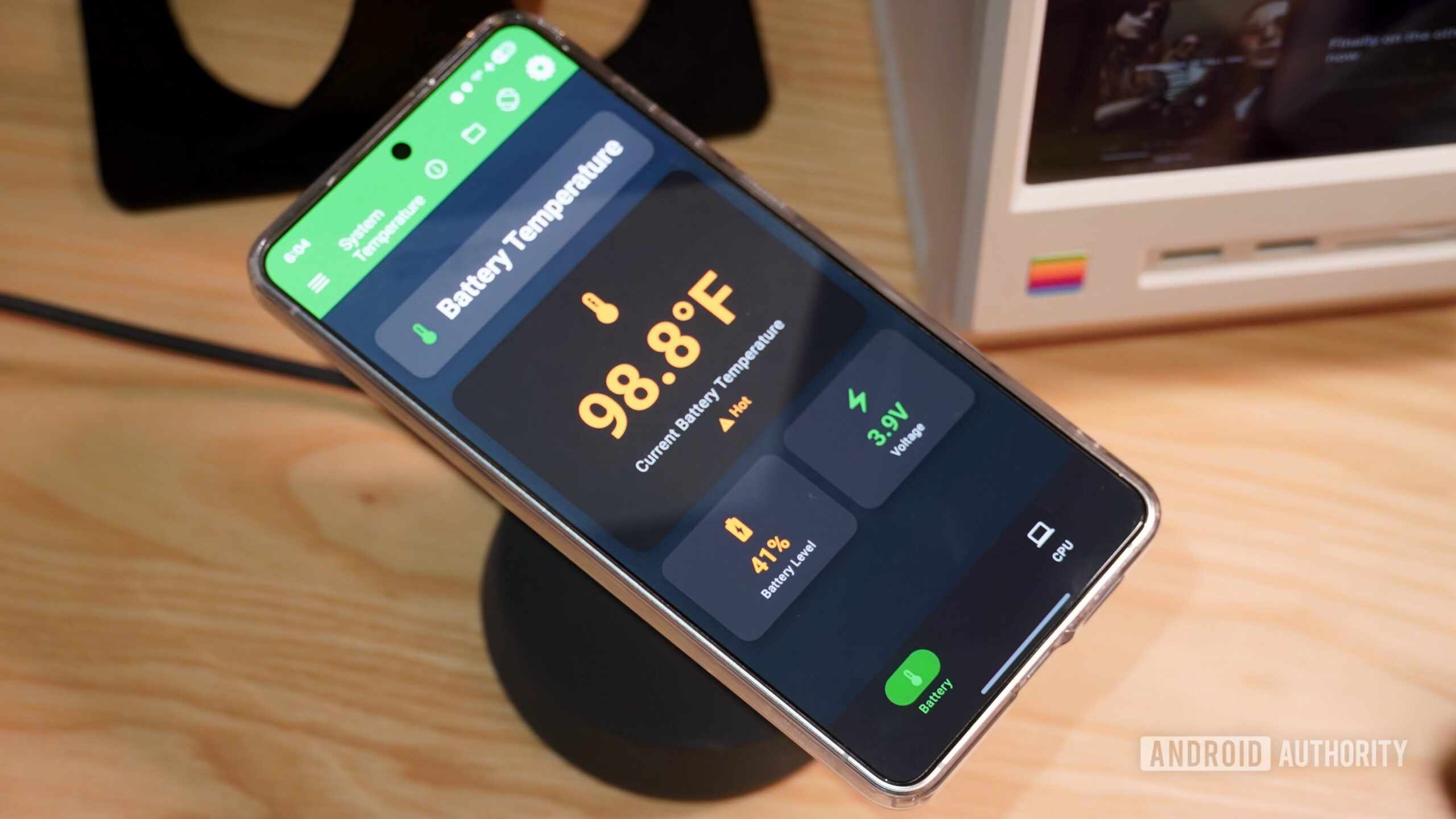
I turned off the cooling fan for the next three consecutive intervals. The device’s battery shot up to 98.1°F after just 10 minutes with the fan disabled. Keeping the fan off, the internal battery temperature crept up to 98.8°F and 100.8°F. Then, without letting the phone cool down, I left my Galaxy S25 Edge on the charger for another 10 minutes with the cooling fan active. I wanted to see if this charger could actually cool my phone down while charging, rather than simply prevent it from heating up.
Sure enough, after the final 10-minute charging interval, my phone’s battery dropped from 100.8°F to 94.8°F. Since this test used the phone’s internal battery temperature sensor, it’s much more accurate than the first one, and shows this Belkin charger really does work.

Brady Snyder / Android Authority
In fact, it took just 10 minutes of charging with the cooling fan disabled for my Galaxy S25 Edge to reach an internal battery temperature warning of “hot” in the Physics Toolbox app. I never saw the full 12°F decrease in phone temperatures Belkin markets, but since those were achieved using internal lab conditions, I’m not surprised.
The key here is that I did see temperatures between 6°F and 8°F cooler when using the active cooling fan. That was enough to keep my phone from stuttering immediately after pulling it off the charger. Hopefully, it’s also doing enough to prolong my battery health.
Don’t want to miss the best from Android Authority?


Why it’s worth paying for pricey wireless chargers with fans

Brady Snyder / Android Authority
I wasn’t thrilled with every aspect of Belkin’s UltraCharge Pro 3-in-1 Qi2 25W charging station. If you have sharp ears, the whine of the small cooling fan is noticeable. This wireless charger also has an Apple Watch charging puck built in, which is unfortunate for Android fans.
The main Qi2 25W charging pad fully supports the Google Pixel 10 series and the secondary one will work with any earbuds case with wireless charging. The smartwatch puck will be a lost cause, though. It might make the UltraCharge Pro 3-in-1 a tough sell at $129.99 for Android users. However, the usefulness of the Qi2 25W charging pad paired with the active cooling fan is enough to make it at least worth considering. In a few months of use, all my phones run cooler while wireless charging, and some of them charge quicker. That’s all it took for me to start using wireless charging at my desk again.
Thank you for being part of our community. Read our Comment Policy before posting.
 By
By